JSON Web Tokens in a MERN Stack (JWT), How I Finally Made It “Click”
When I first heard “JWT authentication” in MERN tutorials, it sounded like a magical passcode. Then I built it a few times (and broke it several times 😅) and realized there's a repeatable pattern:
- User signs in → server returns a token
- Client stores token (carefully) → sends it back on requests
- Server verifies token → allows or blocks protected routes
This post explains that flow in a way that's meant to be evergreen (not tied to one specific library version), while still being practical enough to implement in a typical MERN app.
Source:
SuperTokens
JWT in one sentence
A JWON Web Token, or JWT, is a string the server signs that the client can send back later to prove “I already logged in,” without the server having to store a session in memory and using its precious memory. Which is definitely a concern for us on the free tiers of things.
That's why JWTs are popular for APIs: they work well across multiple devices, multiple frontends, and multiple servers.
Authentication vs Authorization (this is where I got confused)
- Authentication = “Who are you?” (logging in)
- Authorization = “Are you allowed to do this?” (protected routes)
JWTs are usually used for authorization after the user authenticates.
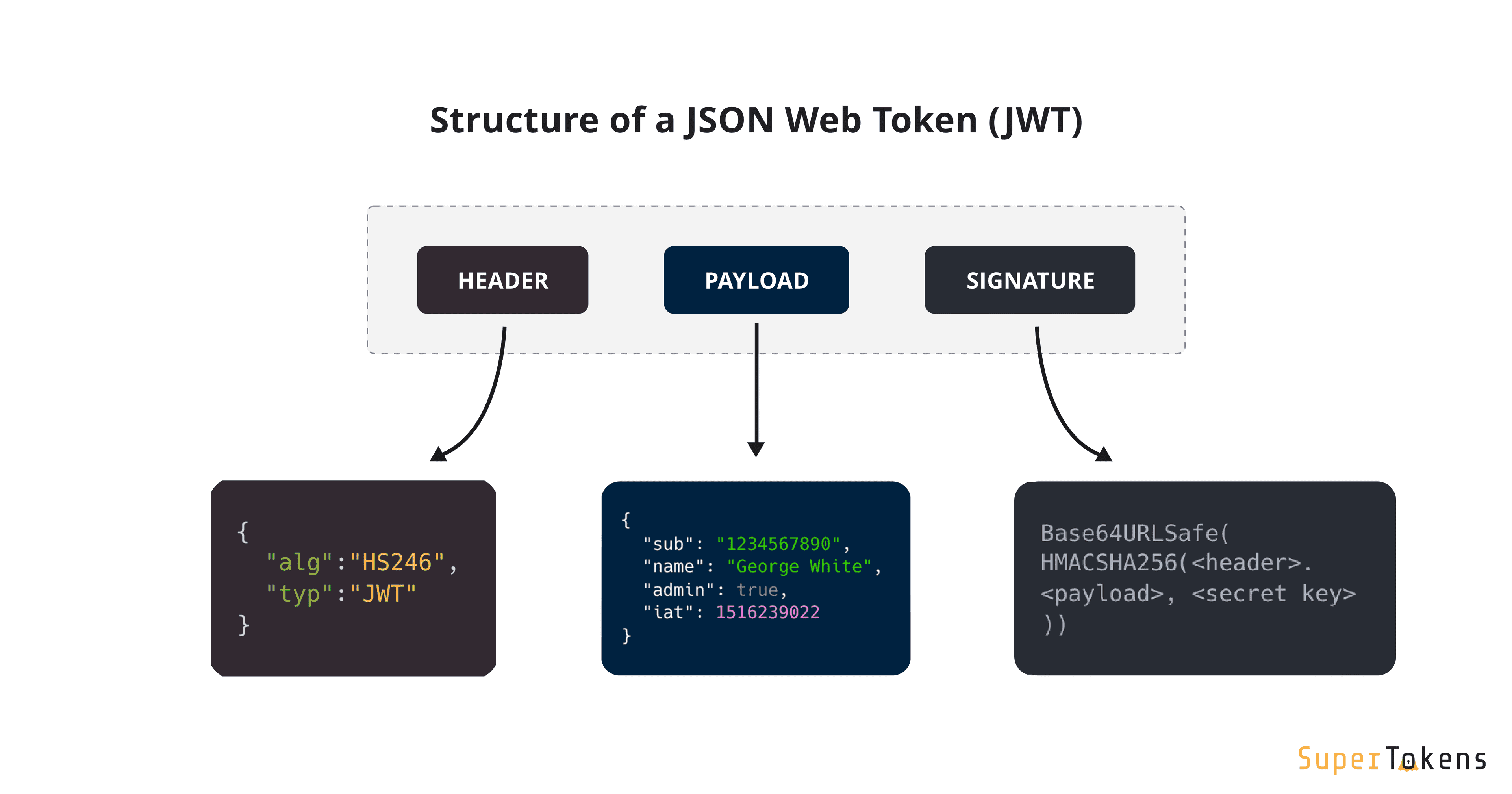
What's inside a JWT?
A JWT looks like:
xxxxx.yyyyy.zzzzz
Those three parts are:
- Header: info about the algorithm used to sign
- Payload: your claims (data) like user id, issued-at time, expiry
- Signature: proves the token wasn't tampered with
Important: The payload is not secret. It's just base64url encoded. Anyone can decode it. So: never put passwords, credit cards, or private data inside JWT payloads.
The “normal” MERN flow
Step A: Signup
- Client sends
{ email, password } - Server validates input
- Server hashes password and stores user in MongoDB
- Server returns either success or error
Step B: Signin
- Client sends
{ email, password } - Server verifies password
- Server returns a JWT (and sometimes user info)
Step C: Protected requests
- Client calls API endpoints like
/api/v1/clients - Client sends token in request headers
- Server verifies token and continues or rejects
A standard API contract I like
On signin/signup success, return:
{
  "token": "eyJhbGciOiJIUzI1NiIsInR5cCI6IkpXVCJ9...",
  "user": {
    "_id": "656c4d...",
    "email": "you@email.com"
  }
}
That keeps the client simple: it has what it needs to save the token and display user info.
Where should I store the token?
This is one of those “depends” answers, but there are two common approaches.
Option 1: Store token in localStorage and sync it into React state
This is the pattern I personally use in most of my MERN projects.
- Save the JWT to localStorage after login/signup
- On app load (or protected route load), retrieve the token from localStorage
- Store it in React state (or context) so components can react to auth changes
A very common flow looks like this:
- Login succeeds → token saved to localStorage
- App/Components mount → useEffect reads token → sets isAuthenticated or some user state
- Protected routes check state before rendering or fetching data
Pros
- Simple and easy to reason about
- Survives page refreshes (user stays logged in)
- Works well for student projects, portfolios, and small apps
- Easy to share auth state across components using Context
Cons
- Token is accessible to JavaScript / more "hackable"
- Requires discipline around input sanitization and avoiding unsafe scripts
- Logout is client-side only (removing token from storage)
Option 2: Store token in an HTTP-only cookie (often considered “best practice”)
- Server sets a cookie:
Set-Cookie: token=...; HttpOnly; Secure; SameSite=...
Pros
- JS can't read it (helps mitigate some XSS token theft)
- Cleaner on the frontend (browser sends cookie automatically)
Cons
- You must think about CSRF defenses (SameSite + CSRF tokens)
- Cross-domain setups require careful cookie settings
The main takeaway
- If you're learning and shipping a portfolio app: a Bearer token in headers is fine, as long as you understand the tradeoffs.
- If you're building something serious: many teams prefer HTTP-only cookies for access tokens.
The classic “Bearer token” request
Frontend (React) sends:
const token = localStorage.getItem("token");

const res = await fetch("https://your-api.com/api/v1/client", {
  headers: {
    Authorization: `Bearer ${token}`,
  },
});
Backend verifies it before allowing protected routes.
What makes a route “protected”?
A protected route is just:
- A normal Express route
- With middleware in front of it that checks for a valid token
If token is valid → call next()
If not → return 401 Unauthorized
Express middleware shape
export function requireAuth(req, res, next) {
  // 1) read Authorization header
  // 2) verify token signature + expiration
  // 3) attach user info to req.user
  // 4) call next()
}
That next() is the whole point: it passes control to the next function in the chain.
A clean “protect everything in this router” pattern
In MERN APIs I like doing this:
// Everything below is protected via the requireAuth middleware:
router.post("/", requireAuth, createClient);
router.get("/", requireAuth, getAllClients);
router.get("/:id", requireAuth, getClientById);
router.put("/:id", requireAuth, updateClient);
router.delete("/:id", requireAuth, deleteClient);
It's easy to see which route is protected, and which aren't in the case if you weren't protecting all routes within a particular route category.
What should the server verify?
When the server receives a token, it should validate:
- ✅ Signature is valid (token wasn't altered)
- ✅ Token is not expired (
exp) - ✅ Token claims match what your app expects (issuer/audience if you use them)
- ✅ User still exists (optional but common: look up user id in DB)
Expiration: you want it (even in student projects)
Tokens should expire. Even a simple setup should include an exp claim.
Why it matters: if a token is stolen, expiration limits how long it can be used.
Good practice:
- Short access token lifetimse (minutes to hours)
- Optional refresh token flow for long sessions
Password hashing is non-negotiable
JWTs don't replace password hashing. Hash passwords with something like bcrypt:
- Never store plaintext passwords
- Never “encrypt” passwords yourself
- Always hash + salt with a proven library
Even though this post is about JWTs, password handling is part of auth.
Logout (the honest truth)
With JWTs, logout is mostly a client-side action:
- remove token from storage
- clear user state
- redirect to login
If you're using cookies, logout usually means:
- server sets the cookie to expire immediately
If you want “real logout” where a token becomes invalid immediately, you need a revocation strategy (like a token blacklist or token versioning). That's more advanced, but it's why many teams mix JWTs with other patterns.
Common JWT gotchas I've personally hit
1) “I'm sending Authorization, but it still 401s”
Usually one of these:
- you forgot
Bearer - backend is expecting a different header format
- your server didn't initialize auth middleware (like Passport)
- token is expired
2) Frontend base URL points to the wrong place
Especially when using separate deployments (frontend + backend). I always double-check:
- local URLs
- production URLs
- env var names
3) Token is saved, but UI doesn't update
That's typically state management:
- Navbar doesn't “know” the user logged in unless you update shared auth state (context/store)
My “evergreen” checklist
If I'm building JWT auth in a MERN app, I try to make sure I have:
- [ ] JWT secret stored in environment variables (not committed)
- [ ] Passwords hashed with bcrypt (or similar)
- [ ] Tokens expire (exp)
- [ ] Protected routes use middleware
- [ ] Authorization header is consistent (
Bearer <token>) - [ ] Frontend auth state updates immediately on login/logout
- [ ] Clear error messages for 401 vs 403 vs 500
Final thoughts
JWT auth isn't hard because the code is complex. It's hard because there are a lot of moving pieces across frontend, backend, headers, and middleware.
Once you memorize the flow, it becomes just another repeatable pattern you can confidently rebuild in new projects.
If you're also building a React Native client for the same API, the exact same JWT flow applies, which is honestly one reason JWTs are so popular in MERN + mobile setups.